Phase 1 - Netowork Infrastructure
Azure SOC Lab Phase 1 Report - Network Infrastructure Deployment with Bicep Templates and NSG Security Configuration · 4 min read
Objectives
The goal of this phase is to deploy the network and security infrastructure of the Azure SOC lab through the use of a Bicep template. In this document, we will cover the success criteria, the Bicep template creation, the deployment of said Bicep template, deployment validation, security posture, and more.
Success Criteria
- Deployment reaches the Provisioning State: Succeeded
- All four subnets exist with the expected CIDRs
- All NSGs show default-deny with only documented exceptions
- All screenshots captured and referenced
Architecture Overview
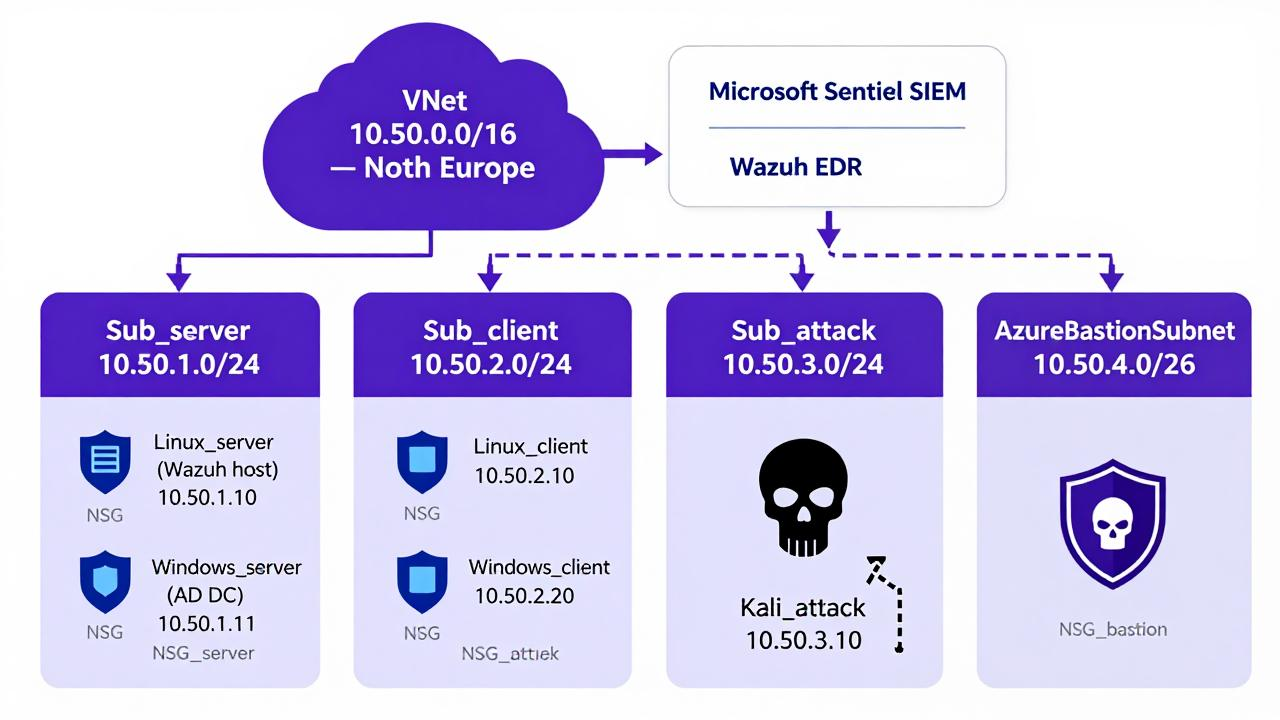
| Subnet | CIDR | Purpose | NSG |
|---|---|---|---|
| Sub_server | 10.50.1.0/24 | AD DC and Wazuh host servers | NSG_server |
| Sub_client | 10.50.2.0/24 | Linux and Windows clients for log creation | NSG_client |
| Sub_attack | 10.50.3.0/24 | Separated Kali Linux machine | NSG_attack |
| AzureBastionSubnet | 10.50.4.0/24 | Bastion for remote connections | NSG_bastion |
Prerequisites
- Active Azure subscription
- VS Code with Bicep extension
- Resource group created in North Europe
Deployment
Bicep Template
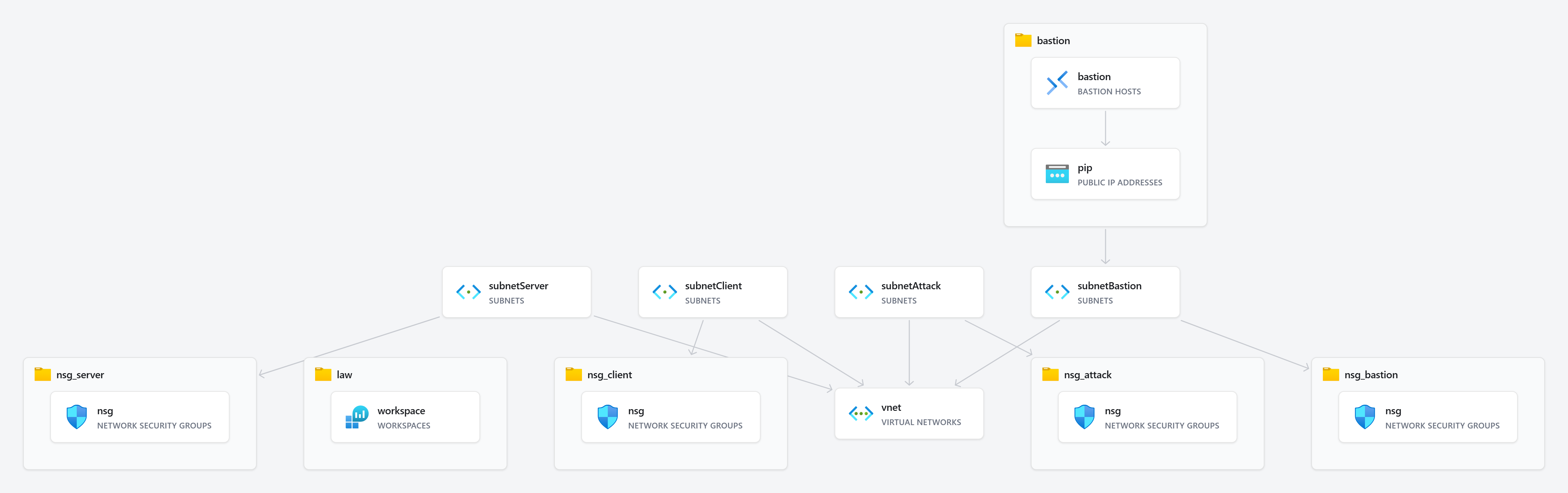
For Phase 1 deployment of the network infrastructure, each major resource was given its own file. There is one root file, “network.bicep”, with dependencies on the “bastion”, “law”, and the various “nsg” Bicep templates. You can view the Bicep templates at:
Deployment Execution
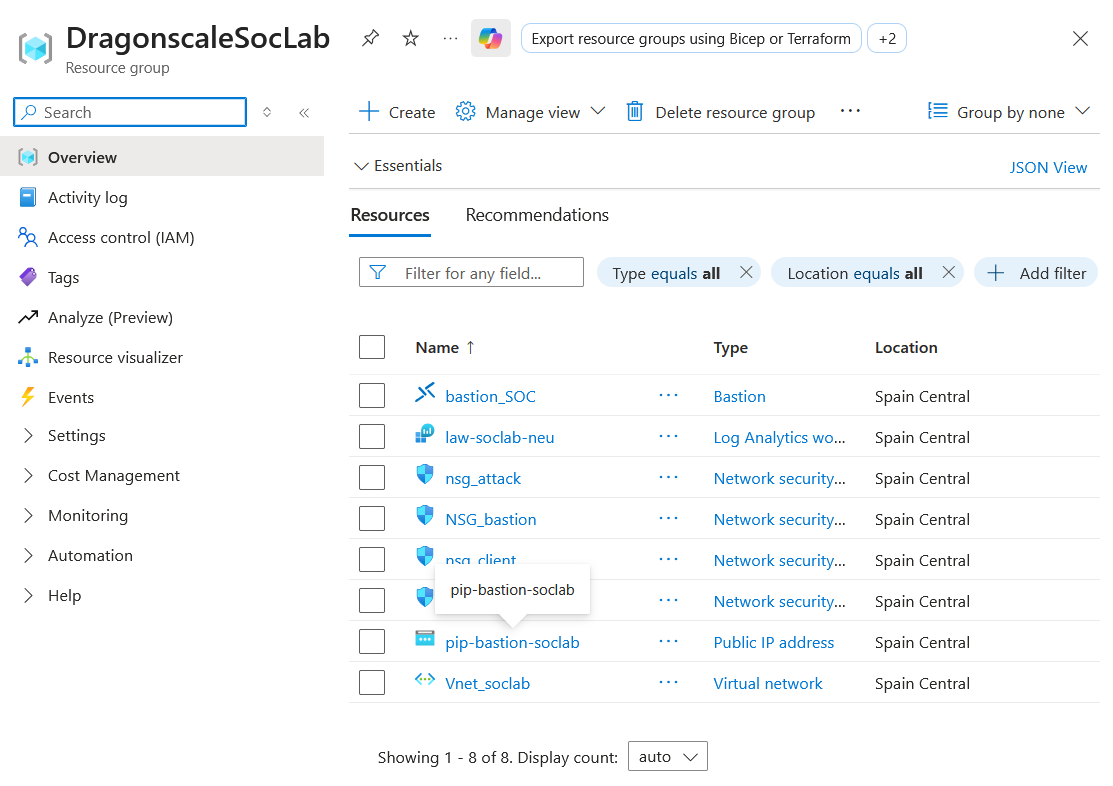
To deploy the network infrastructure, I first need to log in to the Azure CLI using the az login command in the terminal. Afterward, I ran the following command to tell Azure to create the resources.
az deployment group create --name "network-deployment" --resource-group "DragonscaleSocLab" --template-file ".\Phase_1_Network\network.bicep"
In the following image, we can see that the resources were deployed successfully, containing the same architecture as the “network.bicep” graph.
Validation
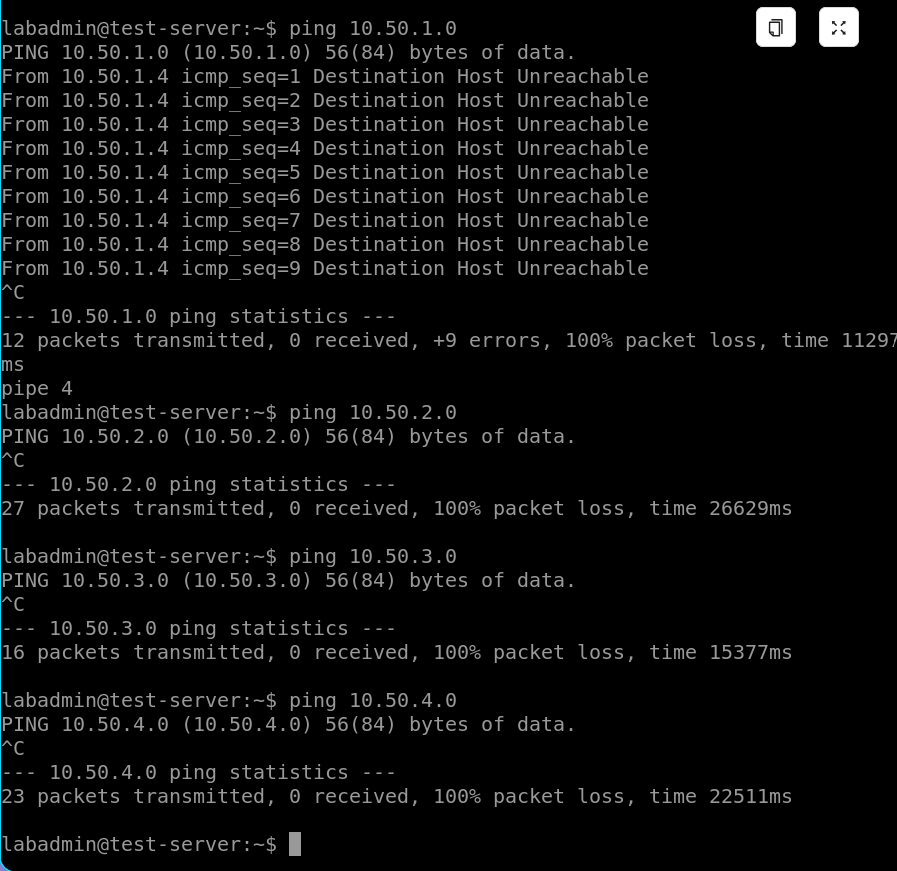
To validate network connectivity between the subnets, I will create a spot VM in each subnet and test the connectivity. I was able to successfully connect via Bastion to the test_client VM in the client subnet. This validates that there is connectivity between Bastion and the subnet (they have the same rules) and that there is no allowed inter-subnet communication at the moment.
Security Posture (NSG Rules)
The default posture of the Network Security Groups is to deny all traffic except connection attempts from Bastion. To achieve this, the client, server, and attack subnets have the following rules.
Simplified rule set:
| Name | Description | Direction |
|---|---|---|
| Allow-SSH-RDP-From-BastionSubnet | Allow SSH and RDP from Bastion subnet only | Inbound |
| Deny-all-inbound | Explicit deny all for inbound traffic | Inbound |
| Allow-DNS-Outbound | Allows outbound DNS | Outbound |
| Allow-NTP-Outbound | Allow NTP outbound | Outbound |
| Deny-all-outbound | Explicit deny all outbound | Outbound |
For the Bastion subnet NSG rules, there are special rules required by Azure.
| Name | Description | Direction |
|---|---|---|
| Allow-HTTPS-Inbound | Allow remote connection to Bastion’s web UI | Inbound |
| Allow-Gateway-Manager-Inbound | Required Azure rule: allows Azure Gateway Manager service to communicate with Bastion (control plane) | Inbound |
| Allow-Bastion-Host-Communication | Required Azure rule: allows traffic between Bastion and VMs for session communication (data plane) | Inbound |
| Allow-Azure-Load-Balancer-Inbound | Required Azure rule: allows Azure Load Balancer to probe the health of the Bastion host | Inbound |
| Allow-SSH-RDP-Outbound | Required Azure rule: allows Bastion to initiate SSH and RDP with target hosts | Outbound |
| Allow-Azure-Cloud-Outbound | Required Azure rule: allows Bastion to communicate with Azure services via HTTPS | Outbound |
| Allow-Bastion-Communication | Required Azure rule: allows outbound data plane traffic between Bastion host instances | Outbound |
| Allow-HTTP-Outbound | Required Azure rule: allows outbound HTTP traffic to the internet for Bastion host validation | Outbound |
| Deny-all-inbound | Explicit deny all for inbound traffic | Inbound |
Issues Encountered & Resolutions
I encountered two main problems during the execution of Phase 1.
The first issue I encountered was that when deploying the Bicep template, the Azure CLI threw an error indicating there was invalid syntax in the DNS rules of the client, attack, and server subnets more specifically, an invalid placeholder for the DNS IP. This was quickly resolved by looking in the Azure documentation for Azure’s official DNS IP address and replacing the placeholder.
The second issue I encountered was a failed allocation of the test VMs because there was no compute capacity for the VM size in my region and zone. To remedy this, I temporarily resized the VMs to a Standard_B2as_v2 size and ran my connectivity tests.
Teardown Procedures
At this phase of the Dragonscale SOC Lab, the most efficient and cost-effective option is to delete the resource group, thereby deleting all of its dependent resources.
Conclusion
Phase 1 of the Dragonscale SOC Lab has successfully deployed the network and security infrastructure of the SOC environment. Using a Bicep-based deployment, each element the network, subnets, and NSGs reached the provisioning state of Succeeded. The subnets deployed with the correct CIDR ranges, and the NSGs correctly enforced the default deny of traffic between subnets, with the only exceptions being the explicitly documented needs of the Azure Bastion service.
The connectivity between Bastion and the subnets was successfully validated by connecting via SSH to test VMs in each subnet. Furthermore, in each connection, by pinging every other subnet, I successfully validated the enforcement of the NSG rules. The two deployment issues encountered the invalid DNS placeholder and the VM size capacity issues were quickly resolved by searching the documentation and resizing the VM.
With the network infrastructure validated and secured, the cloud environment is now ready for Phase 2: Active Directory.